A cheat sheet for System Design

I compiled this cheat sheet as a quick reference for key system design patterns, architectures, and trade-offs I frequently reference during projects.
Picking the right architecture = Picking the right battles + Managing trade-offs
Basic Steps
- Clarify and agree on the scope of the system
- User cases (description of sequences of events that, taken together, lead to a system doing something useful)
- Who is going to use it?
- How are they going to use it?
- Constraints
- Mainly identify traffic and data handling constraints at scale.
- Scale of the system such as requests per second, requests types, data written per second, data read per second)
- Special system requirements such as multi-threading, read or write oriented.
- High level architecture design (Abstract design)
- Sketch the important components and connections between them, but don't go into some details.
- Application service layer (serves the requests)
- List different services required.
- Data Storage layer
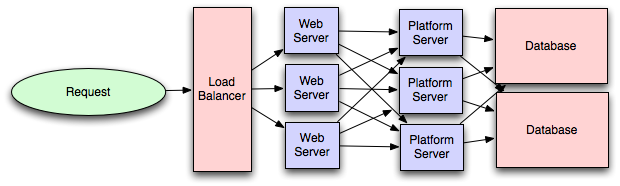
- eg. A high-traffic system includes a web server (load balancer), service (service partition), database (master/slave database cluster) and caching systems.
- Component Design
- Component + specific APIs required for each of them.
- Object oriented design for functionalities.
- Map features to modules: One scenario for one module.
- Consider the relationships among modules:
- Certain functions must have unique instance (Singletons)
- A core object can combine many other objects (composition).
- One object is another object (inheritance)
- Database schema design.
- Understanding Bottlenecks
- Perhaps your system needs a load balancer and many machines behind it to handle the user requests. * Or maybe the data set has grown large enough that you need to distribute your database across more machines. What are some of the downsides that occur from doing that?
- Is the database too slow and does it need some in-memory caching?
- Scaling your abstract design
-
Vertical scaling
- You scale by adding more power (CPU, RAM) to your existing machine.
-
Horizontal scaling
- You scale by adding more machines into your pool of resources.
-
Caching
-
Load balancing helps you scale horizontally across an ever-increasing number of servers. Caching lets you make much better use of the resources you already have, and it makes otherwise unattainable product requirements possible.
-
Application caching requires explicit integration in the application code itself. The application code checks whether a value is already in the cache; if not, it retrieves the value from the database.
-
Database caching is often "free". When you flip your database on, you get some level of default configuration that provides a degree of caching and performance. Those initial settings target a generic use case, so tweaking them to your system's access patterns can greatly improve performance.
-
In-memory caches provide the highest performance by storing the entire dataset in RAM, which is far faster than disk access. e.g. Memcached or Redis.
-
e.g. Precalculating results (e.g. the number of visits from each referring domain for the previous day),
-
e.g. Pre-generating expensive indexes (e.g. suggested stories based on a user's click history)
-
e.g. Storing copies of frequently accessed data in a faster backend (e.g. Memcache instead of PostgreSQL.
-
-
Load balancing
- A load balancer sits in front of the public servers for a high-traffic web service and evenly distributes incoming requests across your group or cluster of application servers.
- Types: Smart client (hard to get it perfect), Hardware load balancers ($$$ but reliable), Software load balancers (hybrid - works for most systems).

-
Database replication
-
Database replication is the frequent electronic copying of data from a database on one computer or server to a database on another. The goal is for all users to share the same level of information. The result is a distributed database in which users can access data relevant to their tasks without interfering with the work of others.
-
Database replication that removes data ambiguity or inconsistency among users has a name: normalization.
-
-
Database partitioning
- Partitioning relational data means decomposing your tables either row-wise (horizontally) or column-wise (vertically).
-
Map-Reduce
- For small systems, ad hoc queries on a SQL database often work fine. That approach stops scaling once data size or write load forces you to shard the database, and queries then need dedicated replicas to run.
- In that case, consider a system built for analyzing large data sets instead of fighting your database. Adding a map-reduce layer makes it possible to perform data and/or processing intensive operations in a reasonable amount of time. You might use it for calculating suggested users in a social graph, or for generating analytics reports. eg. Hadoop, and maybe Hive or HBase.
-
Platform Layer (Services)
- Separating the platform and web application allow you to scale the pieces independently. If you add a new API, you can add platform servers without adding unnecessary capacity for your web application tier.
- Adding a platform layer lets you reuse your infrastructure across many products or interfaces (a web application, an API, an iPhone app, etc). You avoid writing redundant boilerplate code for dealing with caches, databases, and other shared concerns.
Key topics for designing a system
- Concurrency
- Can you manage threads, deadlocks, and starvation? Do you know how to parallelize algorithms? You should also understand consistency and coherence.
- Networking
- Do you roughly understand IPC and TCP/IP? Do you know the difference between throughput and latency, and when each is the relevant factor?
- Abstraction
- You should understand the systems you're building upon. Do you know roughly how an OS, file system, and database work? Do you know about the different levels of caching in a modern OS?
- Real-World Performance
- You should be familiar with the speed of everything your computer can do, including the relative performance of RAM, disk, SSD, and your network.
- Estimation
- Estimation, especially in the form of a back-of-the-envelope calculation, is important because it helps you narrow down the list of possible solutions to only the workable ones. Then you have only a few prototypes or micro-benchmarks to write.
- Availability & Reliability
- Consider how things fail in a distributed environment. Do you know how to design a system to cope with network failures? You must also understand durability.
Web App System design considerations
-
Security (CORS)
-
Using CDN
- A content delivery network (CDN) is a system of distributed servers that deliver webpages and other web content to a user. Which server responds depends on the geographic location of the user, the origin of the webpage, and the location of the content delivery server itself.
- This service is effective in speeding the delivery of content of websites with high traffic and websites that have global reach. The closer the CDN server is to the user geographically, the faster the CDN delivers content to the user.
- CDNs also provide protection from large surges in traffic.
-
Full Text Search
- Using Sphinx/Lucene/Solr - which achieve fast search responses because, instead of searching the text directly, it searches an index instead.
-
Offline support/Progressive enhancement
- Service Workers
-
Web Workers
-
Server Side rendering
-
Asynchronous loading of assets (Lazy load items)
-
Minimizing network requests (Http2 + bundling/sprites etc).
-
Developer productivity/Tooling
-
Accessibility
-
Internationalization
-
Responsive design
-
Browser compatibility.
Working Components of Front-end Architecture
-
Code
- HTML5/WAI-ARIA
- CSS/Sass Code standards and organization.
- Object-Oriented approach (how do objects break down and get put together)
- JS frameworks/organization/performance optimization techniques
- Asset Delivery - Front-end Ops.
-
Documentation
- Onboarding Docs
- Styleguide/Pattern Library
- Architecture Diagrams (code flow, tool chain).
-
Testing
- Performance Testing
- Visual Regression
- Unit Testing
- End-to-End Testing.
-
Process
- Git Workflow
- Dependency Management (NPM, Bundler, Bower)
- Build Systems (Grunt/Gulp)
- Deploy Process
- Continuous Integration (Travis CI, Jenkins).
Links
Introduction to Architecting Systems for Scale
Scalable System Design Patterns
Scalable Web Architecture and Distributed Systems
What is the best way to design a website to be highly scalable?